Lumesa AI Vs Caimera For 2026: Pricing, Brand Training, And Output Control


TLDR
Caimera is a strong fit for quick virtual photoshoots, especially when the brief is simple and the team wants faster image creation without a heavy setup.
Lumesa AI, formerly FlockShop AI, is built around deeper brand training, which matters when the imagery needs to match a specific creative direction over time.
Pricing should be verified directly with both vendors. I wouldn’t trust an old blog post, forum comment, or cached pricing page for current figures.
Caimera appears more software-led, while Lumesa is more brand-system-led in how it approaches image production.
Output control is the biggest practical difference. In my experience, that’s where teams spend the most time after the first test image.
Neither tool is objectively better. The right choice depends on how much brand consistency, review control, and repeatable image direction you need.
Summary
I’d frame this comparison simply. If you need a quick-start AI photoshoot workflow, Caimera can be a good option to review. If you need AI fashion or product imagery that follows a trained brand look across campaigns, Lumesa AI is usually the more relevant comparison. The biggest differences are not only price. They are how much the system learns your brand, how much control you have over outputs, and how repeatable the results are across real production work.
Here’s the quick answer. Caimera is best understood as a virtual photoshoot tool that can help teams create campaign or product visuals faster than a traditional shoot in many cases. Lumesa AI, formerly FlockShop AI, is more focused on training image generation around a brand’s specific visual rules, product details, and approval needs.
That difference matters most when the work moves from a test to production. A one-off image can look good in many tools. The harder question is whether the next 50 images still feel like the same brand. That’s where pricing, brand training depth, and output control start to matter. If you’re comparing Lumesa AI vs Caimera for 2026, I’d focus less on feature lists and more on how each tool handles repeat work.
What Caimera Actually Does
Caimera is generally positioned around AI-generated product and fashion imagery. In plain terms, it helps create virtual photoshoot-style visuals without running a full physical shoot every time.
That can be genuinely useful.
I’ve seen teams spend days coordinating samples, stylists, locations, models, photographers, and post-production for simple campaign images. For a straightforward launch, a quick-start virtual photoshoot tool can save real time.
Caimera can make sense when the goal is:
Generating product or model imagery faster
Testing creative directions before committing to a larger shoot
Producing content for a campaign with a clear, limited brief
Reducing the need for repeated physical shoot logistics
Exploring AI imagery without a long onboarding process
That’s a valid use case. I wouldn’t downplay it.
Where I’d ask more questions is around repeatability. If the first image looks good, what happens when the brand needs a full collection, several campaigns, multiple crops, and a consistent point of view? That is where the comparison gets more specific.

What Lumesa Does Differently
Lumesa AI takes a different route. It focuses heavily on brand training and controlled image production.
The important part is not just that it can generate images. Many tools can. The practical difference is that Lumesa is designed to learn the brand’s visual standards and use them across future work.
That can include things like:
Preferred lighting style
Model direction
Product handling rules
Editorial taste
Cropping and framing preferences
Brand color treatment
Image references that define what “on brand” means
Review and revision patterns
Lumesa was formerly known as FlockShop AI. That matters because some people may still find older references under the FlockShop name while comparing Caimera alternatives. For 2026, I’d treat Lumesa as the current brand to evaluate directly.
One specific proof point I’d look at is Lumesa’s heritage brand example, where the brand’s own team reportedly couldn’t tell the final imagery was AI-generated. I’m careful with claims like that, because “looks real” is easy to say and hard to prove. But this is the kind of proof point that matters more than a general feature claim. It shows the standard Lumesa is trying to meet: not just usable AI output, but imagery that can pass internal brand review.
Pricing Models And What To Verify
I want to be straightforward here. Don’t take a specific dollar figure from this post, or from any comparison post, as current pricing. AI image tools change packaging often. Vendors adjust plans, usage limits, credits, service levels, and enterprise terms.
Verify current pricing directly with Caimera and Lumesa before making a decision.
That said, the pricing model type is still worth comparing.
Caimera appears to fit the category of a more software-led virtual shoot tool. Tools in this category often use subscriptions, usage-based plans, credits, or tiered packages. The exact details can change, so ask Caimera directly how pricing works today.
The questions I’d ask Caimera are:
Is pricing based on seats, projects, image volume, credits, or a mix?
Are revisions included?
Are commercial usage rights included?
Are higher-resolution exports included?
Does the price change for model, product, or campaign use cases?
What happens if a team needs many variations?
Lumesa pricing is more likely to reflect the depth of brand training, setup, production needs, and output review. Again, verify directly. But in practice, a deeper brand-training model usually has a different cost structure than a lightweight self-serve tool.
The questions I’d ask Lumesa are:
What is included in brand training?
How are revisions handled?
Is pricing based on output volume, project scope, brand setup, or ongoing work?
What level of review support is included?
How does pricing change as image needs grow?
What materials are needed before work starts?
The cheapest option on paper may not be the cheapest option in use. I’ve seen that happen often. If a team saves money on the tool but spends hours correcting small brand issues, the real cost changes.
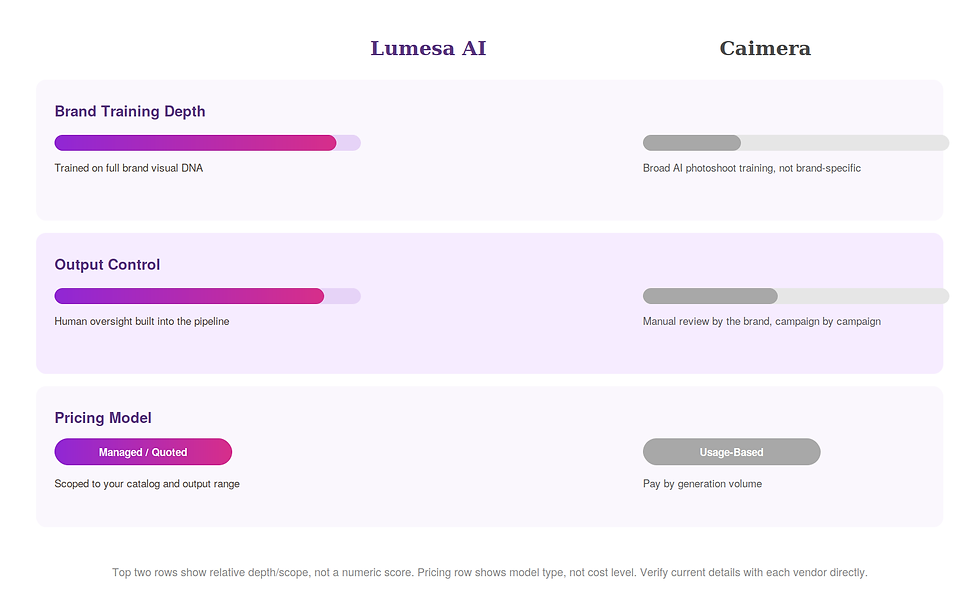
Brand Training Depth Is The Section That Matters Most
Brand training depth is the biggest difference I’d look at first.
A nice AI image is one thing. A trained visual system is another.
Here’s a simple example. Say a fashion brand sells structured outerwear. The brand has a known look: clean studio lighting, restrained poses, soft shadow, no exaggerated smiles, precise garment shape, and a muted background. A generic prompt might create a good coat image. But it may change the sleeve shape, make the fabric look too glossy, use the wrong model styling, or make the pose feel too commercial.
Those details are not small. They affect whether the image feels like the brand.
In my experience, teams rarely reject AI imagery because “AI didn’t work.” They reject it because the output is close, but not close enough. The bag strap sits wrong. The denim wash shifts. The model pose feels off. The image crop doesn’t match the site. The product looks slightly different from the real item.
A quick-start tool can be strong for speed. But if brand rules are detailed, the system needs more context.
Lumesa is built more around that depth. It is meant to absorb brand direction and carry it forward. That gives it an advantage when the work is ongoing, not one-time.
Caimera may still be a good fit if the brand direction is flexible, the campaign is simple, or the team wants to move fast without a deeper setup. That’s not a weakness. It’s a different use case.
The key question is this:
Do you need AI images that look good, or do you need AI images that keep matching your brand after the first batch?
If the answer is the second one, brand training should carry more weight than raw generation speed.
Output Control Changes The Real Cost Of AI Imagery
Output control is where I’d spend the most time in a buying process.
By output control, I mean the ability to guide and correct the final image in ways that matter to production. Not just “make it brighter” or “change the background.” I mean control over the elements that affect whether an image can actually ship.
For fashion and product imagery, that can include:
Product accuracy
Fabric texture
Model pose
Hand placement
Fit and drape
Lighting consistency
Crop ratio
Background style
Variant creation
Review history
Approval workflow
Here’s a common real-world case. A team needs images for a product detail page, a homepage banner, and a seasonal email. The same product appears in all three places. The crops differ. The styling differs slightly. But the product still has to look like the same product.
If the system gives a strong first image but struggles to preserve product details across variations, the team loses time. Someone has to keep prompting, checking, exporting, and correcting. That can erase the speed benefit.
Lumesa’s stronger fit is controlled production. It is better suited when the team has a clear idea of what should not change. Caimera’s stronger fit is fast image creation and concept generation, especially when a team can accept more variation.
For an AI fashion imagery comparison, I’d test both tools with the same real brief. Not a vague prompt. Use a brief that includes the actual product, brand references, crop needs, and review criteria.
A fair test might include:
One product still
One on-model image
One campaign crop
One detail crop
One revision round
One request to preserve exact product details
Then compare the outputs side by side. Don’t only ask which image looks best. Ask which one needed less correction.
Comparison Table
Category | Lumesa AI | Caimera |
Core approach | Brand-trained AI imagery production with more emphasis on repeatable visual rules | Virtual photoshoot-style AI imagery with a faster-start software-led feel |
Output range | Brand-specific fashion and product imagery, campaign assets, variants, controlled production sets | Product and fashion visuals, creative tests, campaign-style images, faster concept output |
Pricing model | Likely tied to brand training depth, production scope, output volume, and review needs. Verify directly with Lumesa | Likely subscription, credit, usage, or package-based depending on current plans. Verify directly with Caimera |
Onboarding | More involved because the system needs brand context, references, and production rules | Likely lighter for simpler virtual shoot workflows |
Review process | Better fit when review, correction, and approval standards matter | Better fit when the team can move quickly and accept more variation |
Best fit | Brands that need consistent imagery across campaigns, products, and channels | Teams that want faster AI photoshoot output for simpler or more flexible briefs |
Which One I’d Choose For Different Scenarios
If I were choosing for a small test campaign, I’d look closely at Caimera. If the goal is to create a handful of visuals and learn what AI can do, a quick-start tool can make sense.
If I were choosing for a brand with strict visual rules, I’d look more closely at Lumesa. That includes brands with a known editorial style, specific model direction, product accuracy concerns, or a review process where small details matter.
For example, a direct-to-consumer apparel brand launching five simple lifestyle images may care most about speed. Caimera could be a practical Caimera alternative 2026 shortlist option to test alongside other tools.
A heritage fashion brand refreshing product pages and campaign visuals across a full season has a different problem. That team needs images that feel like they came from the same creative system. I’d put more weight on Lumesa there.
Neither tool wins every situation. The use case decides.
FAQ
Is Caimera A Good Alternative?
Yes, Caimera can be a good alternative if you need a virtual photoshoot tool and want to create AI fashion or product imagery quickly. I’d especially consider it for simpler campaigns, creative testing, or teams that want a lighter setup.
Is Lumesa More Expensive?
I can’t confirm current pricing without a direct vendor quote. Lumesa may cost more in some cases if the work includes deeper brand training, more review, and controlled production support. But higher sticker price doesn’t always mean higher real cost. If it reduces revision time, it may be worth comparing closely.
Which Tool Gives More Brand Control?
Lumesa is more focused on brand training and controlled output. That makes it a stronger fit when the brand has strict visual rules. Caimera may still work well when the brief is more flexible.
Should I Use Both Tools Before Choosing?
If the decision matters, yes. I’d run the same brief through both. Use one real product, clear references, and the same review criteria. Then compare the amount of correction needed, not just the first image.
What Should I Verify Before Signing Up?
Verify current pricing, usage rights, export quality, revision limits, onboarding requirements, and how each vendor handles product accuracy. Also ask what happens when you need more images than expected.
Closing CTA
The best comparison is a real one. Use your own product, your own brand references, and your own review standards.
If you want to compare Lumesa against Caimera with a practical brief, you can talk to Lumesa about a side-by-side evaluation. I’d bring one product, a few reference images, and a clear list of what the output must get right.
That will tell you more than any feature list.


Comments