The 2026 Playbook for Color-Accurate Ecommerce Product Images

Introduction
Your customer clicks 'buy' on a rust-colored sweater, convinced by a glowing on-model shot. The package arrives, and the sweater is burnt orange. The return costs you a sale, shipping, and trust. Inaccurate product color is the silent killer of ecommerce conversion, a direct escalator for return rates that eats into your margin on every order. For years, brands accepted this gap as a cost of doing business online.
That acceptance is now a competitive liability. In 2026, the industry has converged on a hybrid technical model that closes the color gap without freezing creative output. Forward-thinking brands pair obsessively controlled physical capture, including ghost mannequin photography, with AI systems trained on their specific fabrics, colors, and visual rules. The original color stays locked; the environment around it changes.
This workflow, championed by visual infrastructure providers like 126 LABS, starts with a verified photograph or 3D model. It then uses generative AI for environments and scenes, always validating against the original product color at full resolution. The result is a catalog where an oxblood bag remains oxblood whether it appears on a model on a city street or floating on a white product page. This guide walks you through the exact 8-step workflow to make that consistency your operational reality.
Key Takeaways
The core insight is that in 2026, color accuracy is a systemic result of how you capture, reference, and scale your visuals. Here is what defines a winning workflow:
Accuracy starts with physics: You cannot fix bad lighting or an uncalibrated monitor in Photoshop. Controlled, high-CRI lighting and color-managed capture are the non-negotiable foundation.
Ghost mannequin photography is a repeatability engine: Shooting on a mannequin and compositing it out in post preserves true fabric color and drape, eliminating model-to-model distortion and fold shadows for a consistent catalog standard.
AI is your scaling partner, not your creative director: Off-the-shelf generative AI hallucinates colors. A brand-trained AI system learns your specific materials and color references, creating variations without altering the product itself.
The hybrid workflow is the 2026 benchmark: The most reliable fidelity comes from a sequence of raw capture, color-profile application, AI-driven environment generation, and a final full-resolution color check against the original.
Color fidelity measurably lifts the bottom line: Consistent, accurate imagery directly reduces the customer hesitation that causes returns, and outperforms visually inconsistent collections in head-to-head conversion tests.
Step 1: Master the Color Management Fundamentals
Your monitor has been lying to you for months. Screens drift, software makes assumptions, and by the time you have color-corrected 50 product shots by eye, the shade you call "cobalt" exists in five slightly different versions across your catalog. A customer sees all of them on one page.
Color management is how you stop that. It keeps a specific scarlet consistent from your camera's sensor to the shopper's screen.
Workflow Component | What It Does | Why It Matters for Ecommerce |
ICC Profiles | Standardized data sets that define a device's color output. | They are the universal translators, ensuring a product's red on your camera looks like that same red in Photoshop. |
sRGB Color Space | A narrower color space used by most web browsers and consumer screens. | Exporting your final JPEGs in sRGB is mandatory; a wider-gamut Adobe RGB file will look desaturated and flat on the web. |
Hardware Monitor Calibration | A physical device that measures your screen's output and creates a correction profile. | This is the only way to objectively align your screen with print and web standards, removing subjective eye-balling from your workflow. |
Camera Profiling | Creating a custom profile for your specific camera sensor under your specific lighting. | It neutralizes the slight color twists every sensor adds, giving you a mathematically neutral starting image directly out of the camera. |
Two items from this table do the heaviest lifting: monitor calibration and camera profiling. Get those right and most of the downstream work disappears. ICC profiles handle the translation, and sRGB is a checkbox you tick at export.
Recalibrate your monitor monthly. A display's color accuracy drifts as it ages, and the drift is invisible until you compare a before-and-after. The payoff is a foundation where the color you see is the color you have.
Step 2: Choose and Control Your Lighting for True Color
A crimson shirt shot in January should match the same crimson shirt when its back-in-stock run is shot in July. The variable that breaks that repeatability most often is light. inconsistent spectrum or intensity. Your job is to remove that variable entirely.
Select high-CRI/tlci light sources: Prioritize strobe or LED lights with a color rendering index (CRI) or Television lighting consistency index (TLCI) rating of 95 or above. This score measures a light's ability to reveal colors faithfully compared to a perfect reference source, and anything below that will mute or shift specific fabric dyes.
Standardize your flash power: Set your strobes to a fixed power output and lock in their physical distance to the product. Do not ride the dimmer. This fixes your exposure triangle and eliminates color shifts caused by varying flash duration or power.
Lock in one modifier per product category: Pick a specific softbox, umbrella, or reflector for a given product type, such as all knit tops, and never deviate. Changing modifiers between shoots changes contrast, shadow fill, and subtle color saturation.
Overpower the ambient light: Shoot in a dark or windowless studio at a shutter speed that kills all ambient light. Your shutter, paired with strobe, should capture only the precise, controlled light you add. This makes 100% of the light on your product predictable and identical at the same settings, weeks apart.
Create a physical lighting diagram: Write down the exact light height, angle, distance to product, and modifier for each setup. This is your manufacturing specification for color-accurate light.
Step 3: Capture the Product with Ghost Mannequin and Composite Techniques
For apparel, how a garment is shaped during capture directly impacts how the eye reads its color. A live model breathes, shifts, and creates micro-shadows that darken fabric. A flat lay flattens texture, making a brushed wool look dull. Ghost mannequin photography (also called invisible mannequin or hollow man photography) solves this by putting every garment into the same precise shape, shot after shot.
Ghost mannequin photography shoots a garment on a specialized, modular mannequin and then digitally removes the mannequin in post. The process usually involves compositing two or more shots: a full front image to get the perfect drape and shape, and an inside shot of the neckline or waistband. The result is a floating, 3D-like image that preserves the fabric's true drape, texture, and color without the distortion of fold shadows or body contours.
The color benefit is simple physics. A mannequin holds the fabric in a repeatable geometry, every time. Light hits the fabric at the same angle across your entire catalog, producing consistent highlight and shadow values. You remove the organic variation of a live session so the fabric's true color defines the visual on its own terms.
A platform like Lumesa AI can then take this identical, mannequin-based shot and intelligently place it onto AI-generated models in infinite scenes. The mannequin-based photo repeats cleanly across many items, giving automated pipelines a color-stable input that is straightforward to scale.
Step 4: Anchor Your Workflow with Reference Color Targets
Your eyes adapt to a scene and will lie to you. An X-Rite ColorChecker or similar reference target never lies. It functions as the legal contract between your physical product and your Raw file, so you can lock in objective, batch-correctable color across thousands of images.
Place a target in the first frame: For every single lighting setup or new product batch, take one photo with a standardized color target held in the product's primary light path. This is your Rosetta Stone for the entire batch.
Use the neutral gray patch for white balance: In your raw processor, use the white balance tool to click directly on the target's certified neutral gray square. This single click neutralizes the entire scene's color temperature and green/magenta tint perfectly.
Build a target a custom camera profile: Shoot the full target once under your standard studio strobes. In Adobe Lightroom or Photoshop, use that image to create a custom camera calibration profile. Apply this profile to your entire catalog at import, automatically mapping your camera's raw colors to scientifically accurate ones.
Normalize in post with a single click: With the custom profile applied, select the reference photo and use 'Match Total Exposure' or a similar tool to sync the exact color adjustments to every other photo in the batch. The target lets you correct 200 SKUs in the time it takes to fix one.
Step 5: Integrate Brand-Trained AI for Consistent, Scalable Color
How much would a 2% color shift cost you in returns?
Generic generative AI tools are creative engines, not factual documentarians. An off-the-shelf model prompted to place a 'cobalt blue dress in a cafe' will produce a blue it learned from millions of photos, not your specific Pantone code. Creative reinterpretation of details is the central risk of pure AI generation for ecommerce.
A brand-trained AI system solves this by flipping the learning model. Instead of starting from internet randomness, it is trained on your approved imagery, specific fabrics, lighting setups, and color references. A brand trained visual infrastructure provider like Lumesa AI functions as a visual production line, learning a brand's visual language, composition rules, and styling systems so that a generated background never overwrites the exact product color.
This is where the 2026 hybrid workflow proves its value. You provide a verified physical capture or 3D model as the locked product layer.
The AI, now fluent in your brand's rules, generates the environment, casting realistic yet controlled lighting onto the digital model. A virtual try-on feature, for instance, can render a garment onto a person and maintain faithful fabric color and detail only when trained on high-fidelity source images of that specific garment.
Step 6: Post-Produce with a Color-First, Hybrid Workflow
The sequence of operations defines the outcome. A color-first, hybrid workflow in 2026 means you never let AI touch your product's actual pixels. The raw file, corrected to a perfect match against the physical sample, becomes a sacred anchor. That anchor is locked as an uneditable bottom layer in a composite where generative AI can fill everything else.
This process turns post-production from a correctional slog into an additive assembly line. You start with your normalized raw file, apply the custom camera profile, and build the product's color to the final approved sample. Only then do you use AI tools to drop in a campaign environment or change a backdrop, but with a strict boundary. The final guardrail is a mandatory validation at 100% zoom on a calibrated display, checking key color patches against the reference photo.
Step 7: Validate Accuracy and Address Screen-to-Reality Mismatches
The final boss of color accuracy is the one variable you can never fully control: the customer's screen. A perfect photo of a soft white blouse viewed on an uncalibrated, blue-tinted smartphone will look icy and stark. Acknowledging this gap builds more trust than trying to pretend it does not exist.
Your verification loop must stretch beyond your studio. Soft-proof your final sRGB JPEGs in a color-managed browser to confirm no saturation clipping occurs during export. Review the images on at least three unmanaged consumer devices: a MacBook, a standard Windows laptop, and a mid-range Android phone. What looks like a rich forest green on your reference monitor might look black on a dim consumer screen.
Set an internal delta-E tolerance threshold for your production workflow. A delta-E of less than 2 is generally imperceptible to the human eye and is a solid goal for inter-batch consistency. While you can't calibrate a shopper's phone, you can control the context.
Supplement your imagery with objective descriptive copy. State in the product description that the item is 'warm, burnt orange with a slight brown undertone' so the buyer's brain has a linguistic anchor. Publish a brief 'viewing color' disclaimer on your site, letting customers know that screen settings cause minor variations. A candid acknowledgment reduces the shock when the physical item doesn't exactly match a hyper-saturated OLED screen and cuts returns that come from shattered expectations.
Step 8: Measure Success with Conversion Benchmarks and Return Rates
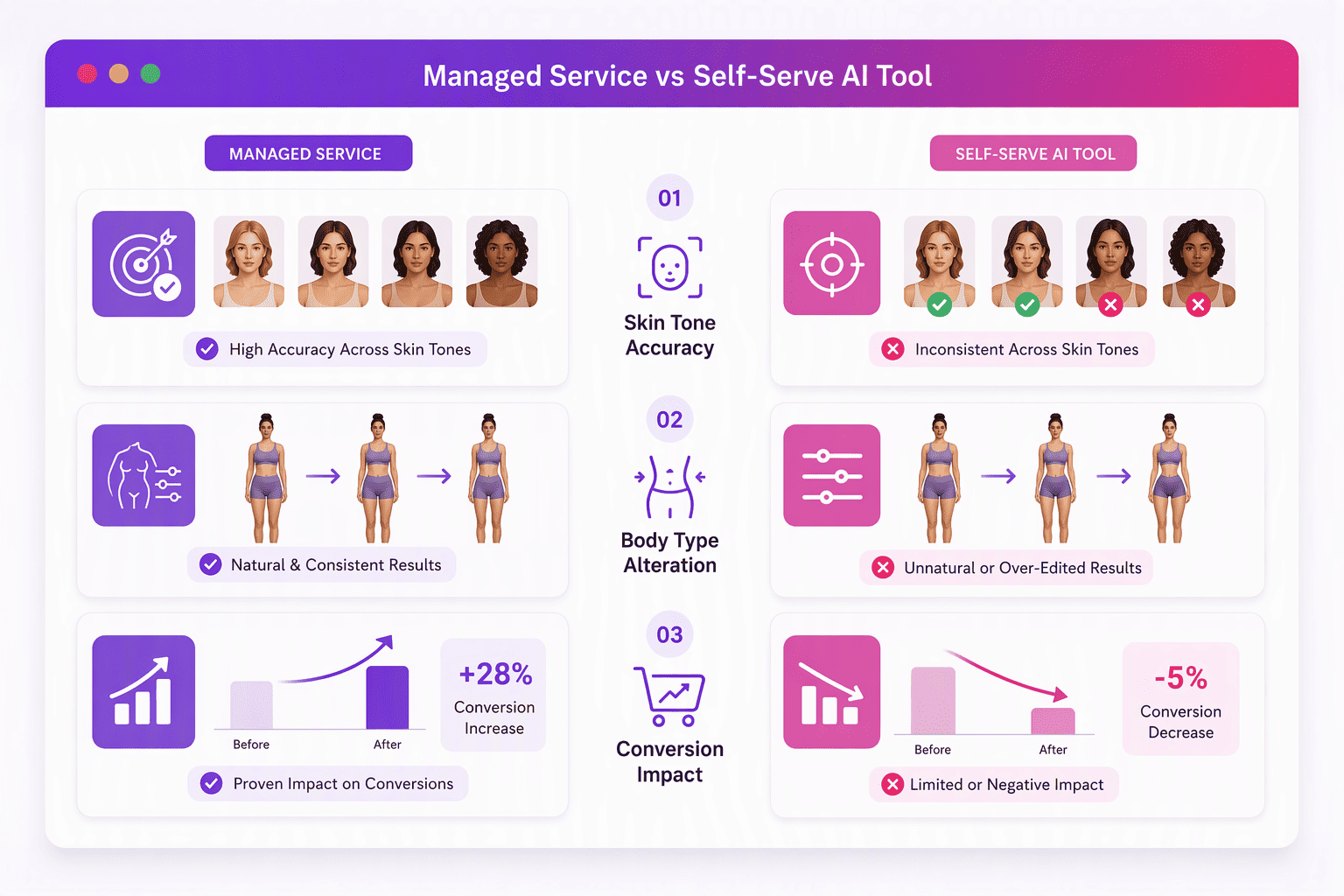
This workflow is a business investment with measurable returns. The clearest proof comes from how shoppers react. Consistent, color-accurate product imagery directly reduces the cognitive friction a buyer feels when trying to imagine an item in their life. The evidence backs it up: providers in this space report a meaningful financial impact, with one managed service claiming a 20 to 30% uplift in conversion and a specific case study pointing to a 3% conversion lift from integrated visual operations.
The mechanism is clear when you track the right two signals. Segregate your return data by reason code and specifically track 'Color Mismatch' or 'Item Not as Pictured' rates against your total orders. A downward trend in this bucket after implementing the hybrid workflow is your direct ROI.
Pair this with A/B tests where a product page with the new color-accurate, AI-scaled imagery is run against the old static shot. Watch qualitative metrics that preview customer sentiment.
Monitor product reviews for language like "lighter than online" or "exactly like the photo." The shift from the former to the latter over time proves that your controlled capture and brand-trained AI pipeline is bridging the ecommerce gap and building a reputation for trust.
Conclusion
In 2026, color-accurate product imagery functions as a data-rich visual asset that belongs to a single brand. The formula that actually produces consistent results pairs the objective truth of controlled physical capture with scaled AI automation trained on your specific rules. Relying on a static single-photoshoot look across a growing catalog breaks down the moment your product mix or lighting needs shift.
The workflow in this article, from a calibrated monitor through to validated full-resolution AI composites, acts as a practical barrier against that breakdown. For fashion retailers and brands launching at scale, building a visual pipeline that starts with reference-grade input and ends with validated, consistent output is the most direct path to lifting conversion, cutting returns, and making every product page deliver what the buyer expects.
See Which Fit Makes Sense for Your Catalog
If you're trying to figure out whether your actual need is a full catalog production platform or a narrower feature like a simple try-on preview, request a demo and we'll talk through the actual scope of what you're solving for, not just the platform's capabilities.
Frequently Asked Questions
What is ghost mannequin photography and how does it make product colors look accurate?
Ghost mannequin photography shoots a garment on a mannequin and digitally removes it, creating a floating 3D image. It preserves true fabric color and drape. Since the mannequin holds the fabric in an exact, repeatable shape, light hits the surface consistently every time, eliminating the shadow and shape distortions that shift color on a live model.
Which technologies are brands using in 2026 to automate color-accurate ecommerce imagery?
Brands are using AI visual infrastructure platforms that combine controlled input with generative output. The core tech stack starts with color-managed raw photo capture or 3D scanning, uses hardware-calibrated monitors, and then feeds into brand-trained AI systems trained on a brand's specific colors, fabrics, and lighting to generate consistent, scalable images.
How does a brand-trained AI system improve color consistency versus traditional photoshoots?
Traditional shoots introduce human, lighting, and model variation, causing subtle color shifts across SKUs. A brand-trained AI learns a brand's exact color references and visual rules. It applies this consistently at scale for every AI-generated environment or model, eliminating the creative color reinterpretation that generic AI tools produce.
What does it cost for a brand to adopt AI-powered visual infrastructure for product photos?
Costs vary widely by provider and scope. Self-serve virtual try-on tools can charge per image or session, while enterprise managed services typically involve higher upfront investment. Lumesa AI, for example, offers a managed end-to-end service, indicating that a significant upfront plus ongoing operational cost for custom infrastructure is the norm.
Can virtual try-on and AI-generated models still keep fabric color and detail faithful to the physical garment?
They can, but only when fed high-fidelity source material of the exact product. Virtual try-on works by combining a product image with a person and will render bright orange as orange if the input is perfect. Faithful output is conditional: a system trained only on generic promotional photos will fail, but one anchored to specific deep product photography succeeds.
What workflow benchmarks or conversion results prove that color-accurate AI imagery works for fashion retailers?
Fashion retailers see direct loss reduction in 'Color Mismatch' return rate and positive metrics in A/B product page tests. Lumesa AI, for example, claims a 20 to 30% conversion uplift from its brand-trained managed service, with one specific case study reporting a 3% lift. The performance gain stems directly from reducing shopper uncertainty.
Sources
Product photography tips to help increase sales | Adobe - www.adobe.com
@126 LABS | AI Product Photography vs Traditional Photoshoots: How to Choose - www.126labsai.com

Comments